Convert Video to Image Files on Mac
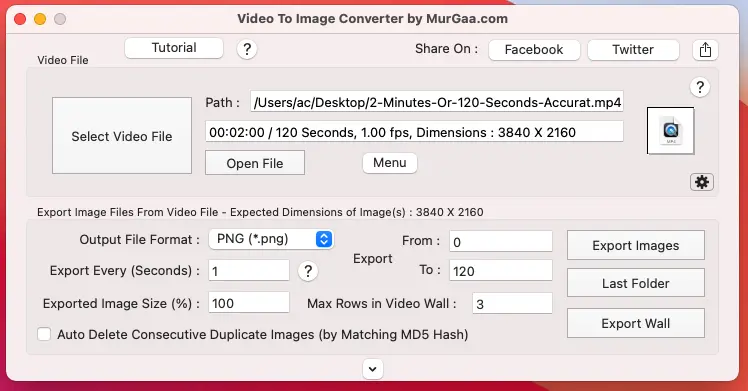
Convert any Video File to sequence of Image Files with Video to Image Converter on your Mac running macOS 11 (Big Sur) and later upto macOS 26 (Tahoe). This Free to try Image Converter for Mac allows you to select Image File Format for Video to Image Conversion. You can also select almost any Video File on your Macintosh to be converted to Image Files / Video Frames. Yes you can define the time duration (in seconds) after which an Image File from the Video must be generated by doing Video to Image Conversion. Extracting Frames / Images from Video Files is really easy with this Video to Image Converter for Macintosh.
Download Video to Image Converter for Mac
Download Video to Image Converter for Mac and try it on your macOS to extract Image or Picture Files from a Video File. The free trial has a usage limitation and adds an extra watermark to the image files created by Video to Image Conversion.
Features of Video to Image Converter
This Video Conversion Utility for Macintosh allows you to convert any selected Video file to Images in various file formats. You can opt to convert Video File to Images in either BMP (*.bmp), JPG (*.jpg), PNG (*.png), GIF (*.gif) or even TIFF (*.tiff) file formats. Apart from Video to Image File conversion you can also change dimensions of the picture or image files created by this Video Converter Utility. Various Video File Formats are supported such as MOV Files, MP4 Files, etc for Video to Image Conversion.
This Software is provided on a Free to try basis and pay the activation fee of only $6.99 and use it on 1 Mac for upto 6 months from the date of payment. The Activation fees can be paid using Credit or Debit Card or even by PayPal Account. The Software does not requires any installation and is ready to use after download. You can also watch a video tutorial of the Video to Image Conversion and learn how easy and quick is to convert Video to Image or Picture Files. You can also have a look at Extract Frames from Video on Macintosh which provides step by step process to Extract Frames from Video Files on you Mac with this Video to Image Converter for Mac
Frequently Asked Questions
Which macOS versions are supported by Video to Image Converter for Mac?
The software is fully compatible with macOS 11 (Big Sur) and later, up to macOS 26 (Tahoe).
What image formats can I convert my video into?
You can convert your video files into sequence images in various popular formats, including BMP (*.bmp), JPG (*.jpg), PNG (*.png), GIF (*.gif), and TIFF (*.tiff).
Can I control the time interval for frame extraction?
Yes. The utility allows you to define the exact time duration in seconds after which an image file/video frame should be generated from your video.
Are my videos uploaded online during conversion?
No. All frame extraction processes are performed entirely offline, locally on your Mac. Your video files are never uploaded to any online service, ensuring fast performance and privacy.
What are the limitations of the free trial version?
The free trial download features a usage limit restriction and automatically adds an extra watermark to the generated image files.
How much does the software cost and what payment methods are accepted?
The activation fee is $6.99 for use on 1 Mac for up to 6 months. Payment can be made securely via Credit Card, Debit Card, or PayPal.